Open Google Search Console, compare the last 3 months with the 3 before, and sort your pages by clicks lost. Then look for pages with many impressions but few clicks. Those two lists are your update queue. For each page, decide whether to refresh it, merge it into a stronger page, delete it, or leave it. Refresh in place: keep the URL, answer the question in the first lines, add what searchers now ask, and fix the title. An AI agent can do the finding and the rewriting, and you approve each page before it changes.
By Yaniv Mizrahi, founder of TalkGenAI. The agent run below is on our own WordPress site, 4MeNearMe.com, November 2026.
How do I know if a blog post needs updating?
Six signs, and where to check each one:
| Sign | What it means | Where to check |
|---|---|---|
| Clicks fell over the last 3 months | Content decay: newer pages answer the query better | Search Console, Performance, Compare dates |
| Many impressions, almost no clicks | Google shows the page but the title or snippet doesn't earn the click | Search Console, Pages tab, sort by impressions |
| Average position 11 to 30 | Close to page one, a better answer can move it | Search Console, Position column |
| The post names an old year, price, version or tool | Readers and AI assistants skip outdated facts | Read the post |
| The top queries are not what the post answers | The search intent moved | Search Console, click the page, then Queries |
| A competitor's newer page took your spot | They covered something you didn't | Search the main query in a private window |
One sign is enough to put a post on the list. Two or more puts it at the top.
Which old blog posts should I update first?
Not every post on the list should be refreshed. Pick one decision per post:
| Decision | When | What you do |
|---|---|---|
| Refresh | The topic is right, the page is thin or dated, it gets impressions | Rewrite in place, same URL |
| Rewrite | The topic is right but the page answers a different question than people search | New structure around the real query, same URL |
| Merge | Two of your posts compete for the same query | Move the best parts into the stronger page, redirect the weaker one to it |
| Delete | No impressions in 12 months, no links, no business value | Remove it, or redirect it if it has backlinks |
| Leave | It ranks in the top 3 and clicks are steady | Don't touch it |
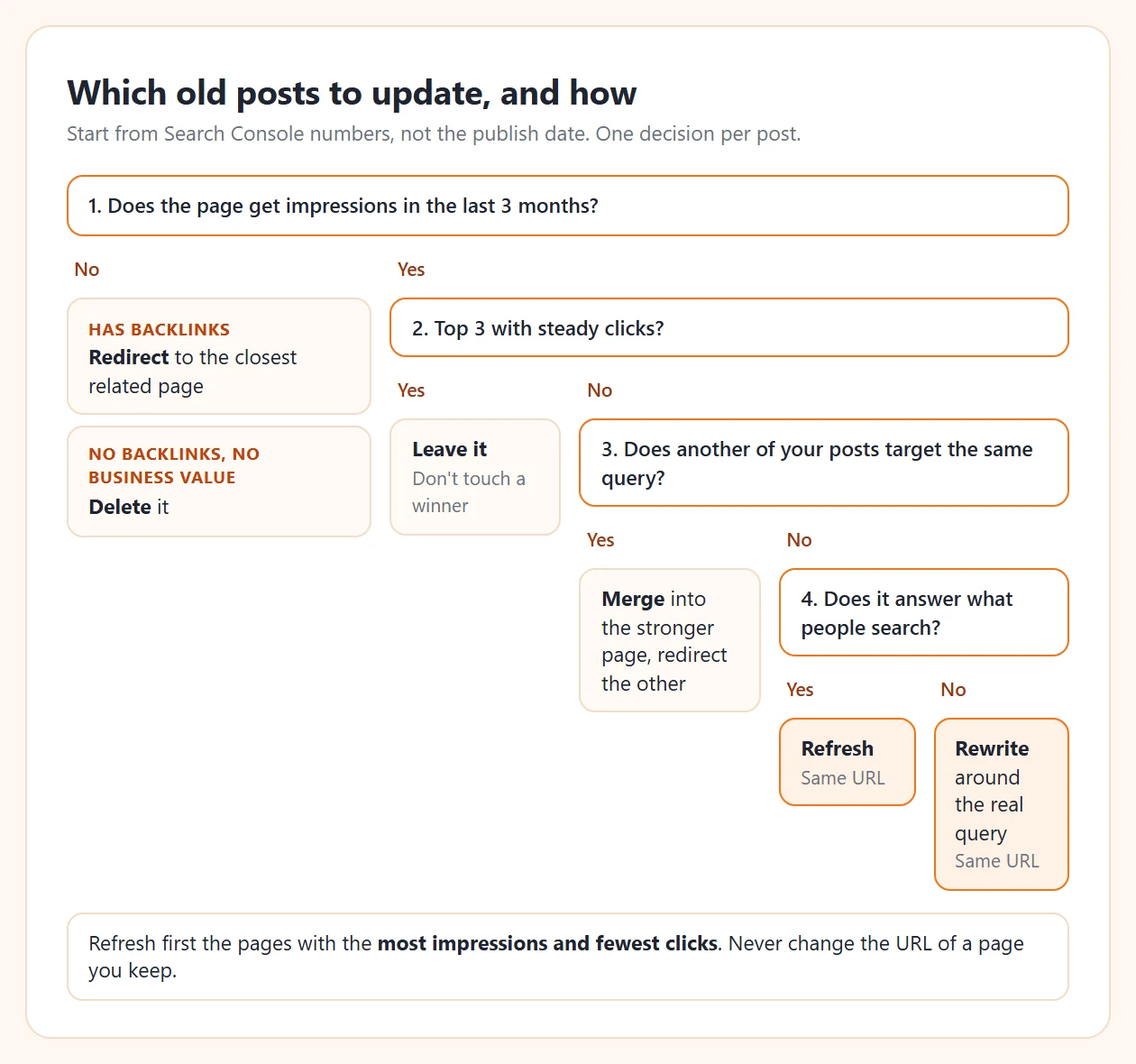
Order the refresh list by impressions. A page with 500 impressions and 0 clicks has more to gain than a page with 40.
How do I find blog posts to update in Google Search Console?
This takes about ten minutes.
1. Find the pages losing clicks (content decay)
- In Search Console, open Performance, then Search results.
- Click Date, choose the Compare tab, then Compare last 3 months to previous period.
- Open the Pages tab below the chart.
- Click the Clicks difference column to sort from the biggest loss.
Every page near the top lost clicks it used to get. Click one, then open Queries to see which searches it lost.
2. Find the pages Google shows but people skip
- Set Date back to Last 3 months, and switch on Average CTR and Average position at the top.
- In the Pages tab, sort by Impressions.
- Use the filter icon on the table: Position greater than 10.
What's left is pages with real demand that sit below page one. These are the best refresh candidates.
Our Search Console + AI agent guide covers the other half of this data: queries that deserve a new article instead of a refresh.
What should I change in an old blog post?
Work through this list, top to bottom:
- The first two sentences. Answer the main query directly. This is what Google's snippet, AI Overviews and ChatGPT quote.
- Title and meta description. Put in the words from the page's top queries. A page with impressions and no clicks usually has a title problem first.
- New sections from real queries. Each query in Search Console that the page doesn't answer becomes an H2 or an FAQ question.
- Outdated facts. Years, prices, screenshots, tool names, steps that changed.
- Internal links. Link to your newer posts on the same topic, and link to this page from them.
- Structure. Short sections, a table where readers compare things, an FAQ at the end.
- The updated date, but only if the content really changed.
And what not to do:
- Don't change the URL. The page's rankings and links live on that address.
- Don't invent new numbers to look fresh. Wrong prices or statistics hurt more than old ones.
- Don't swap the topic. If the page should be about something else, write a new article and link to it.
Our WordPress blog SEO guide has the settings (permalinks, SEO plugin, schema) to check while you're in there.
Can an AI agent update old blog posts for me?
Yes. The agent does the slow parts: it finds the pages, reads them, writes the new version and replaces the page. You read the new version and say yes. We do it in Claude Desktop connected to the TalkGenAI MCP server. It takes four steps, and each one is a tool the agent calls:
| Step | What you ask | Tool the agent calls | Cost |
|---|---|---|---|
| 1. Find | "Which of my pages get impressions but almost no clicks?" | get_rankings with sort: low_traffic |
Free (Growth plan) |
| 2. Check | "Look at the first one. Is it safe to refresh?" | inspect_page |
Free |
| 3. Rewrite | "Refresh it. Keep the URL and the facts." | refresh_page, then get_article |
5 credits, 8 with a new image |
| 4. Replace | "Yes, replace the live page." | replace_live_page |
Free, needs your yes |
Step 1 on 4MeNearMe.com returned pages like these (Search Console, last 28 days, before the refresh):
| Page | Impressions | Clicks | Average position |
|---|---|---|---|
| Pressure washing business insurance | 524 | 0 | 85.7 |
| Hazard insurance for small business | 502 | 0 | 91.7 |
| Car wash and auto detailing insurance | 448 | 0 | 81.2 |
That's 1,474 impressions and 0 clicks across three pages. Google connects them to real searches but ranks them on page 8 or 9. We refreshed all three, plus a fourth page, and saved these numbers as the baseline. We'll add the after numbers here once Google has had a few weeks with the new versions. Until then, the honest result is "the pages are better written", not "traffic went up".
Two safety rules are built in. inspect_page refuses pages built with a page builder (Elementor, Divi and others), pages with forms or shortcodes, and the home page, because a plain rewrite would break their layout. And replace_live_page never changes the site on the first call: it returns the exact question for you, and only replaces the page after you say yes.
The full WordPress walkthrough, with what the refresh keeps and what it changes, is in Refresh old WordPress posts with AI. Refresh is also the last step of the loop in What is an AI SEO agent.
How often should I update old blog posts?
Run the Search Console check once a month and refresh a few pages each time, not all of them at once. That way you can see which changes moved a page before you repeat them. Give each refreshed page four to six weeks before you judge it: Google needs to recrawl it, and positions move slowly at first. Request indexing in Search Console (URL inspection, then Request indexing) right after the update to speed up the recrawl.
Try it in 5 minutes
- Get a free agent key: app.talkgen.ai/connect-agent. No card.
- Connect your WordPress site with the free plugin: Connect WordPress. Connect Search Console in the dashboard.
- Add TalkGenAI to Claude Desktop: Connect Claude Desktop.
- Ask:
Find the pages on my site that Google shows but people rarely click.
Pick the one with the most impressions, check whether it is safe to refresh,
and tell me what you would change. Don't change anything on the site yet.
Last updated: 2026-11-08