Connect your WordPress site and an AI agent to TalkGenAI, then ask the agent for pages that Google shows but people don't click. For each one it checks whether the page is safe to rewrite, writes a better version from the page's own text and its Search Console queries, and shows it to you. Only after you say yes does it replace the live page, at the same URL, with a new SEO title and meta description. Pages built with a page builder are refused, not broken.
By Yaniv Mizrahi, founder of TalkGenAI. The steps below were run in Claude Desktop on our own WordPress site, 4MeNearMe.com, in November 2026.
What do I need?
- WordPress with the free TalkGenAI plugin, version 2.7.12 or later: Connect WordPress.
- Search Console connected in the TalkGenAI dashboard. Finding low-traffic pages by query needs the Growth plan or above. On other plans, give the agent a page URL yourself.
- An AI agent connected to the TalkGenAI MCP server. We use Claude Desktop: Connect Claude Desktop.
What does an AI refresh change, and what does it keep?
This is the part to check before you let any tool rewrite your posts.
| Changes | Stays the same |
|---|---|
| The body text: structure, depth, headings, FAQ | The URL (slug) |
| The title, if you ask for a new one | The page's subject and language |
| The SEO title and meta description (Yoast, Rank Math, All in One SEO or SEOPress) | Business facts: prices, addresses, names |
| The featured image, only if you choose a new one | The page's own internal links, kept as preferred links |
| The post type and the post itself (it is updated, not deleted and recreated) |
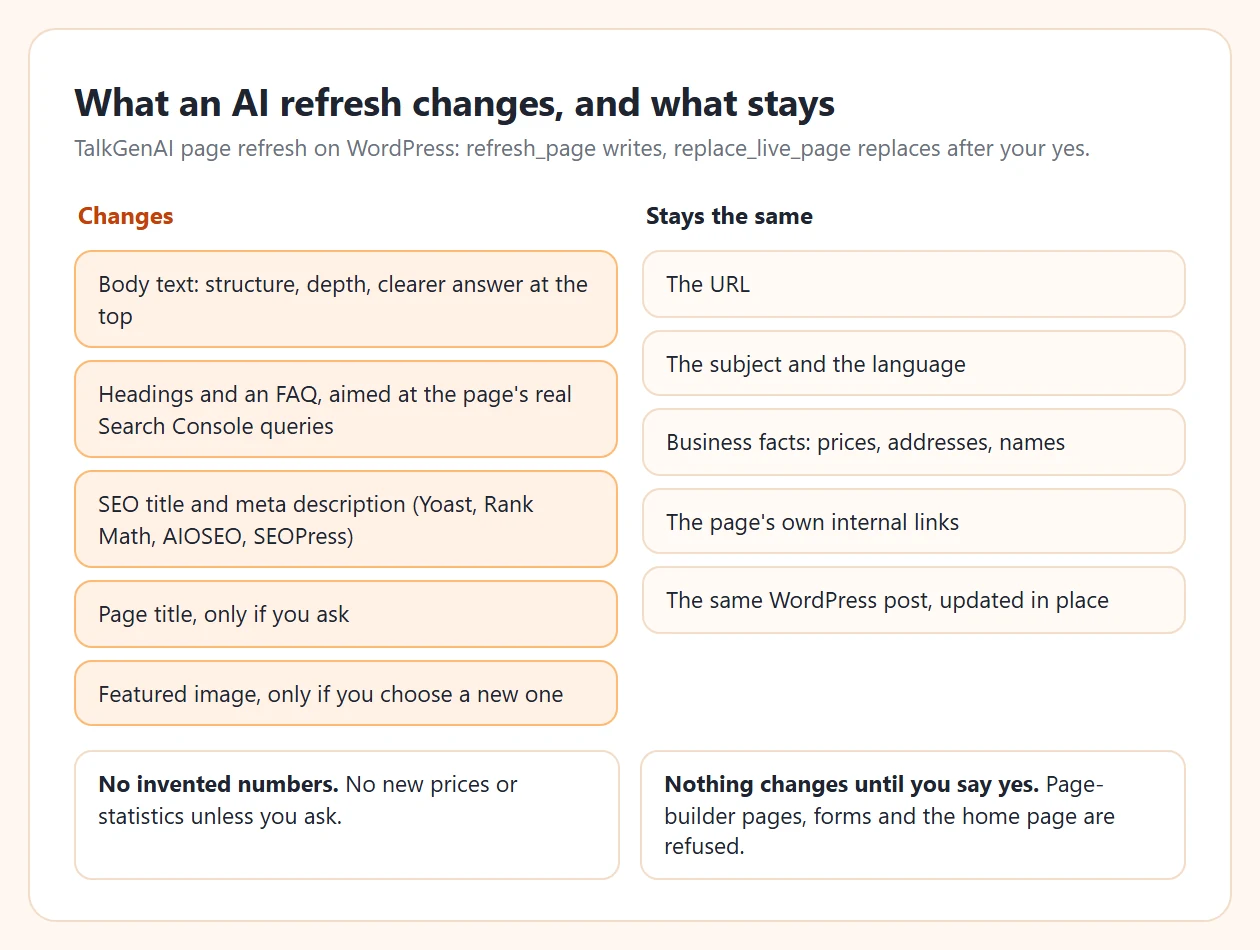
Two rules matter most. The refresh doesn't add new numbers: no invented prices or statistics unless you ask for them. And the refresh doesn't touch the site by itself. Writing the new version and replacing the live page are two separate steps.
How do I refresh a post, step by step?
Four prompts in Claude Desktop. Each one makes the agent call one TalkGenAI tool.
1. Find the pages worth refreshing
Which pages on my site get Google impressions but almost no clicks?
Show the top 10 with impressions, clicks and average position.
The agent calls get_rankings with sort: low_traffic. That's every page with at least 20 impressions in the last 28 days, fewest clicks first, with all its queries added up. On 4MeNearMe.com the list started with a page about pressure washing business insurance: 524 impressions, 0 clicks, average position 85.7.
2. Check that the page is safe to rewrite
Inspect the pressure washing insurance page. Is it safe to refresh?
inspect_page is free and read-only. It returns the page's word count, its Search Console numbers, its current SEO title and description, its top queries, and safe_to_replace. If the page was built with Elementor, Divi, WPBakery or another builder, or has forms or shortcodes, the answer is no and the agent tells you why. A plain-text rewrite would wreck that layout, so it doesn't try.
3. Write the new version
Refresh it. Aim it at the searches it already shows up for, keep the facts,
and add an FAQ. Don't publish anything yet.
The agent calls refresh_page. On the first call it doesn't charge anything. It comes back with the image question for this page, for example "This page already has a featured image. Keep it (free), or generate a new one?", along with the brand voice and image style from your Marketing Brain. You answer, the rewrite starts, and it costs 5 credits, or 8 with a new image. The agent polls get_article until it's done, then shows you the new title, the headings and a summary next to the old page.
4. Approve the replacement
Looks good. Replace the live page.
The agent calls replace_live_page. The first call never changes the site. It returns the exact question to ask you, naming the page and what will be replaced. Only when you say yes does the agent call it again with confirm_overwrite: true. The page keeps its URL, and the response tells you the two things to do next: clear your cache, and request indexing in Search Console.
If only the title and description are the problem (lots of impressions, the content is fine), ask for that alone. update_page_seo_meta changes just those two fields, and it works on page-builder pages too.
How do I refresh old posts at scale without breaking the site?
"At scale" should mean a steady routine, not 200 pages in one afternoon:
- Once a month, ask for the low-traffic list.
- Refresh 3 to 5 pages, highest impressions first.
- Read each one before you say yes. It takes two minutes and catches the odd sentence you'd rather not have.
- Wait four to six weeks, then compare clicks and position against the baseline. TalkGenAI saves each page's numbers at the moment you refresh it.
- Repeat what worked. If refreshed pages climb, take the next batch. If they don't, check the update checklist before spending more credits.
When not to refresh: if the page should be about a different topic, write a new article instead and link to it. A refresh keeps the subject on purpose.
We refreshed four 4MeNearMe pages this way in November 2026, three of them starting from 448 to 524 impressions and 0 clicks a month at positions 81 to 92. We'll add their after numbers to this guide once Google has re-ranked them.
Is a refresh plugin or an AI agent better for old posts?
They do different jobs:
| Tool type | What it does | Picks the pages | Rewrites the text | Asks before changing a live page |
|---|---|---|---|---|
| Republish or date plugins | Bumps the date or reposts old posts | You, or at random | No | Usually not |
| AI writer plugins inside WordPress | Rewrites a post you open in the editor | You | Yes | You press update |
| An agent with TalkGenAI | Finds pages from Search Console, rewrites, replaces at the same URL | Search Console data | Yes, from the page's own text and queries | Yes, every time |
A date bump alone doesn't make a page better, and Google can tell. If you're already happy writing in the WordPress editor, an editor plugin is fine. The agent route is for when picking the pages is the hard part, or when you look after more than one site.
For new posts rather than old ones, see the WordPress MCP guide (drafts from Claude) and the SEO blog writer guide (from the dashboard, no agent). Also run through the WordPress blog SEO settings once per site.
Try it in 5 minutes
- Get a free agent key: app.talkgen.ai/connect-agent. No card.
- Install the TalkGenAI plugin (2.7.12 or later) and connect your site: Connect WordPress.
- Add TalkGenAI to Claude Desktop, or your own agent: Connect your agent.
- Ask:
Inspect https://<your-site>/<an-old-post>/ and tell me whether it is safe to refresh,
what its Search Console numbers are, and what you would change. Don't change anything yet.
inspect_page is free, so this first look costs nothing.
Last updated: 2026-11-08