Five settings matter more than any writing tip: readable permalinks, an SEO plugin that holds each post's title and meta description, a featured image with alt text, a small set of categories, and a site that tools can reach over HTTPS. Get these right once and every post inherits them. Get them wrong and a good article still shows up in search with an ugly address and no description.
By Yaniv Mizrahi, founder of TalkGenAI. The details below come from our WordPress plugin and from the connection problems we fixed for customers.
Which permalink setting should I use?
Use Settings > Permalinks > Post name, so a post lives at /your-post-title/ and not at /?p=123. A readable address helps people decide to click, and it carries the keyword. Pick it before your first post. Changing permalinks on an existing blog changes every address, and old links break unless you add redirects.
Do I need Yoast SEO or Rank Math?
Yes, one of them. WordPress has no built-in field for a meta description or a separate SEO title, so without a plugin search engines guess the description from the first lines of the post. Both plugins also build the XML sitemap and add canonical tags.
| Field | What to put |
|---|---|
| SEO title | Under 60 characters, the phrase people search |
| Meta description | One sentence that answers the title, under 160 characters |
| Focus keyphrase | The main phrase, used to check the post |
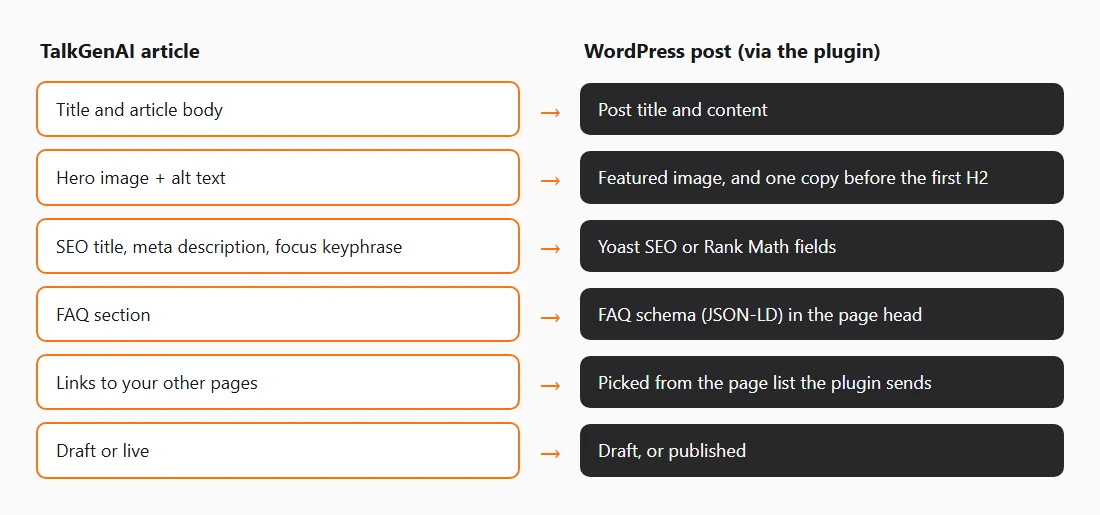
When TalkGenAI publishes a post, the plugin fills all three in Yoast or Rank Math, whichever is active. With neither installed, the post is still published, and the description is simply not set.
How should I set up the featured image?
Every post should have a featured image with alt text that says what the image shows. Themes use it on the blog list, at the top of the post or both, and social networks use it as the preview. Check how your theme crops it: a wide banner crop can cut off the subject.
A second image inside the post helps long articles. The TalkGenAI plugin uploads the hero image to your media library, sets it as the featured image with its alt text, and also places it in the post before the first H2. If your theme already shows the featured image above the title, you will see it twice. Remove the in-post copy in the editor, or check this once on a draft.
How many categories should a blog have?
Few. Five to ten categories that match what you sell, each with enough posts to be a useful page. Every category is its own archive page, and dozens of near-empty ones give search engines thin pages to crawl. Leave tags off unless you really use them to browse. In TalkGenAI you can choose a default category per site in the connection's Settings.
How do internal links work on WordPress?
Each new post should link to two or three older posts on the same subject, and to the page that sells the service. The hard part is knowing what you already have. The TalkGenAI plugin sends your published posts and pages, with their real titles and permalinks, to TalkGenAI, and articles link to those pages with natural anchor text. Because the list comes from WordPress itself, it works even when your sitemap is blocked from outside.
Why can a tool connect to my site but not publish?
Usually Cloudflare or a security plugin. Requests from cloud servers often get a challenge page instead of your site, so a publish or a sitemap read fails while the site works fine in your browser. The fix is either to allow the tool in your firewall rules, or to use a plugin that makes the request from WordPress outwards, which those rules never block. That is why TalkGenAI recommends its plugin over WordPress application passwords, which some hosts also block. Your site also needs HTTPS: plain http:// addresses are refused.
How do I avoid duplicate posts?
Search your blog for the topic before you write. If an old post already answers the question, update it instead of publishing a second one, because two posts on the same question compete with each other. A slug that ends in -2 is the warning sign: WordPress adds it when the address is already taken. TalkGenAI remembers the post it created, so publishing the same article again updates that post instead of creating a copy.
How do I publish posts to WordPress automatically?
Install the free TalkGenAI plugin from WordPress.org, generate a connection token in the plugin, and paste it in the TalkGenAI dashboard with your site address. Posts are saved as drafts unless you choose Live. The full steps are on Connect WordPress. For the writing side, the settings for each article and the review checklist, see AI SEO blog writer.
Checklist before your next post
- Permalinks are set to Post name.
- Yoast SEO or Rank Math is active.
- The theme shows the featured image the way you want.
- You have five to ten categories, not fifty.
- The site loads over HTTPS, and your firewall does not block your publishing tool.
Try it on your WordPress site
Create a free account, install the plugin, and publish one article as a draft. Free credits cover about three articles. No card.
Last updated: 2026-11-02