Build a CMS collection with a name, slug, rich text body, summary and main image, then bind the collection template page's SEO title, meta description and Open Graph image to those fields. Publish the site once so the template exists, and remember that a staged item is not on your live site until it is published. With that in place, every post gets its own title, description and preview image automatically.
By Yaniv Mizrahi, founder of TalkGenAI. The details below come from building our Webflow connector and from setting it up with our first Webflow customer.
Which fields does a Webflow blog collection need?
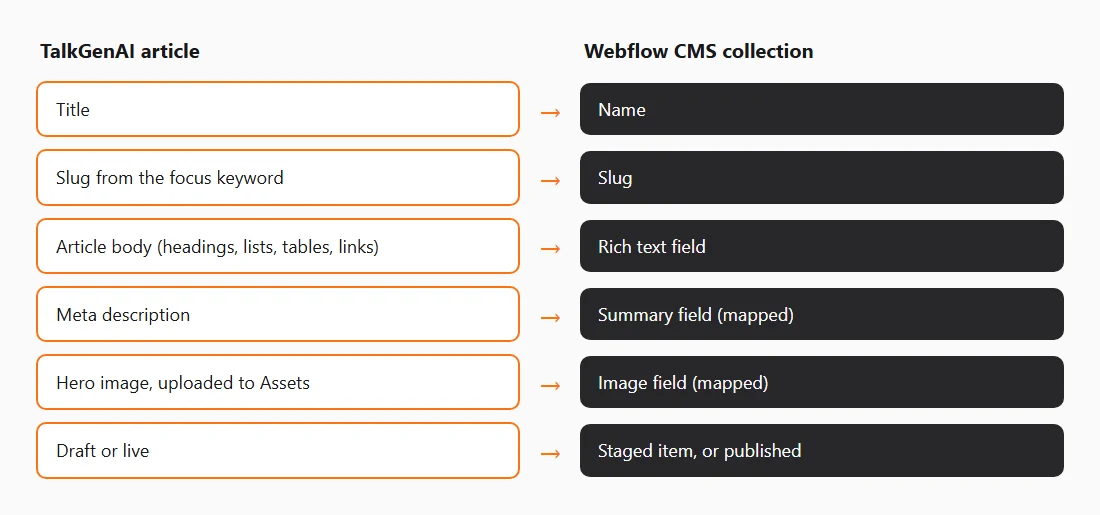
Webflow gives every collection a Name and a Slug. Add three more:
| Field | Webflow type | Why it matters |
|---|---|---|
| Name | Plain text (built in) | The post title and the H1 on the template |
| Slug | Slug (built in) | The address, for example /blog/graph-database-vs-sql |
| Post body | Rich text | The article: headings, lists, tables, links |
| Summary | Plain text | The meta description and the blog card text |
| Main image | Image | The top image, the blog card and the social preview |
Name the fields plainly ("Post body", "Summary", "Main image"). Tools that publish into Webflow, ours included, match fields by name and suggest the mapping for you.
Where do the SEO settings for each post go?
On the collection template page. Open the template page's settings and bind:
| Setting | Bind it to |
|---|---|
| Title tag | Name, plus your brand if you like |
| Meta description | Summary |
| Open Graph image | Main image |
Do this once and every post, past and future, gets its own values. Leave it empty and every post shares one description, which search engines treat as no description.
Why does my new post show a 404?
Because it is staged, not published. Webflow keeps a CMS item as a staged draft until the site, or the item, is published. Staged items do not exist on the live site, so their address returns a 404. That is the expected state of a draft.
There is a second case: a new collection whose template has never been published. Until you publish the whole site once, even a "live" item has no page. Webflow refuses to publish items live in that state, and TalkGenAI saves the post as a staged draft and tells you why. Publish the site once from the Designer, and later posts can go live directly. Going live through the API also needs a paid Webflow site plan.
Do tables and links survive in Webflow rich text?
Yes. Webflow's rich text field keeps headings, lists, links and HTML tables, so comparison tables stay tables. Style them in the Designer through the rich text element, the same way you style H2s, or they will look bare.
How should posts link to each other?
Each post should link to two or three related posts and to the page that sells the service. Webflow can generate a sitemap for you (keep the auto-generated sitemap on in the site's SEO settings), and TalkGenAI reads it to find your pages. A sitemap lists addresses, not titles, so clear slugs help: /blog/graph-database-vs-sql tells any tool, and any reader, more than /blog/post-17. Write slugs as short phrases.
How do I avoid duplicate posts on Webflow?
Search the collection before you write, and update an old post rather than adding a second one on the same question. Webflow requires every slug in a collection to be unique, so a second copy gets a different address and competes with the first. TalkGenAI remembers the item it created, so publishing the same article again updates that item. If a slug is already taken by a different post, it adds a short suffix rather than failing.
How do I publish posts to Webflow automatically?
Create a Site API token from the site's own settings, not the workspace, with CMS, Sites and Assets set to Read and write, and paste it in TalkGenAI. Then choose the collection and check the suggested field mapping. A workspace token has no CMS access and fails. The full steps and errors are on Connect Webflow.
Checklist before your first post
- The collection has Name, Slug, Post body, Summary and Main image.
- The template page's title, description and Open Graph image are bound to fields.
- H2, H3 and tables are styled in the rich text element.
- The site has been published once since the collection was created.
- Slugs are short phrases, not numbers.
Try it on your Webflow site
Create a free account, connect your Webflow site, and publish one article as a staged draft. Free credits cover about three articles. No card.
Last updated: 2026-11-02