Give your blog a clear name and handle, fill in each article's SEO title and description, use a wide featured image, and link every article to the products or collections it is about. Add FAQ schema where the article answers questions. A store blog's job is to bring searchers who are close to buying, so an article that ranks but never links to a product does half the work.
By Yaniv Mizrahi, founder of TalkGenAI. The details below come from building our Shopify connector and testing it on a Shopify development store on 1 November 2026.
How should I name the blog and its address?
Every Shopify store starts with a blog called News at /blogs/news. If your articles are buying guides or how-tos, a handle such as /blogs/guides describes them better and reads better in search results. Change it early: renaming the handle later changes the address of every article, and old links need redirects (add them under Online Store > Navigation > URL Redirects if Shopify did not create them for you).
Keep article handles short and close to the search phrase. Shopify builds the handle from the title, so a long title gives a long address unless you edit it.
Which SEO fields matter on each article?
Each article has a Search engine listing section at the bottom of the editor.
| Field | What to put |
|---|---|
| Page title | Under 60 characters, the phrase people search |
| Meta description | One sentence that answers the title, under 160 characters |
| URL handle | 3 to 6 words |
| Excerpt | A short summary for the blog list |
If the meta description is empty, Shopify uses the start of the article, which is rarely a good answer. TalkGenAI sets the description when it publishes.
What size should the featured image be?
Wide. Many Shopify themes, including Dawn, show the article's featured image full width at its original shape. In our test, a normal 3:2 image filled the whole first screen, and the title only appeared after scrolling. A 2:1 banner kept the title visible. TalkGenAI crops the hero image to 2:1 before uploading it for this reason. Always add alt text that describes what the image shows; it is the image's text for search and for screen readers.
Right after an image is uploaded, Shopify can show a grey placeholder for a few seconds. Reload before deciding something broke.
How do I connect articles to products?
Link to them in the text, where the reader needs them. A guide about choosing running shoes should link to the shoe collection where it talks about cushioning, and to a specific product where it recommends one. Two or three links to products or collections per article is plenty. Also link to one or two related articles, so readers who are not ready to buy keep reading.
TalkGenAI picks internal links from your store's sitemap, which Shopify creates for you. It includes products, collections, pages and articles.
Does a Shopify blog support FAQ schema?
Not on its own. Shopify themes do not add FAQ markup to articles. You can add a JSON-LD block to the article body, and Shopify keeps it. When an article has an FAQ section, TalkGenAI adds the FAQ schema to the body as JSON-LD, so search engines and AI assistants can read the questions and answers directly.
How do I avoid duplicate articles?
Search your blog before you write, and update an older article instead of writing a second one on the same question. Shopify keeps article handles unique within a blog, so a second copy gets a different address and competes with the first. TalkGenAI remembers the article it created, and publishing the same article again updates it, keeping it visible or hidden as it was.
How do I publish articles to Shopify automatically?
Shopify no longer lets stores create custom apps inside the admin, so tools now connect through an app. For TalkGenAI, you create a small app in the Shopify Dev Dashboard with the read_content and write_content scopes, install it on your store, and paste its Client ID and secret. If your store still has an older custom app, its shpat_ token works too. Articles are saved hidden unless you choose Live. The full steps are on Connect Shopify.
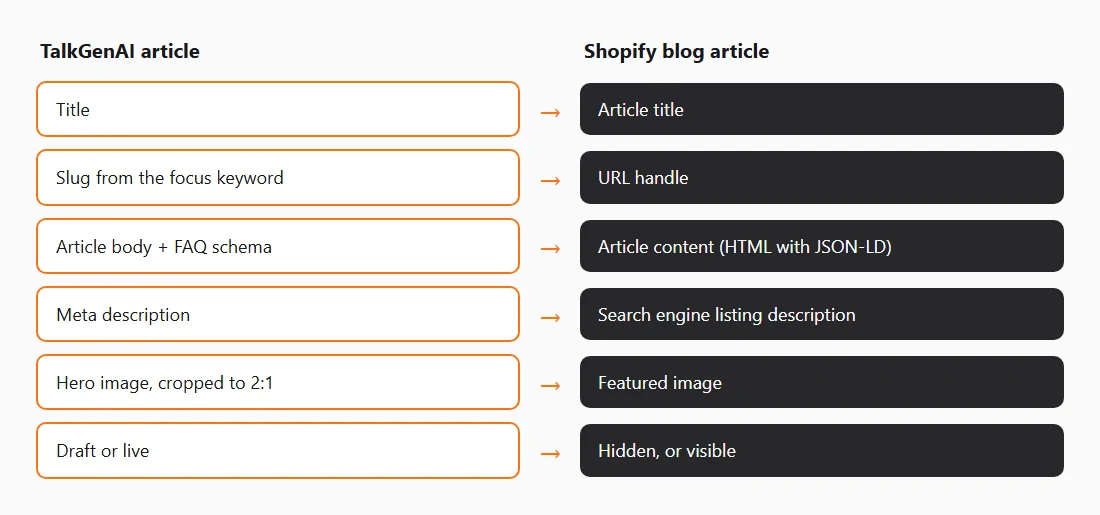
Checklist before your first article
- The blog has a name and handle that describe the articles.
- Each article has its own page title and meta description.
- The featured image is wide (about 2:1) and has alt text.
- The article links to the products or collections it mentions.
- Articles with questions carry FAQ schema.
Try it on your Shopify store
Create a free account, connect your store, and publish one hidden article. Free credits cover about three articles. No card.
Last updated: 2026-11-02